Preparing fMRIprep data for connectivity analysis
BIDSLayout if necessary.pip install datalad-installer
datalad-installer git-annex -m datalad/packages
pip install datalad
You can then install the dataset in the current working directory and download a single BOLD + confounds file by typing:
datalad install https://github.com/OpenNeuroDatasets/ds004489.git
cd ds004489
datalad get derivatives/sub-114/ses-1/func/sub-114_ses-1_task-catLoc_run-1_space-MNI152NLin2009cAsym_desc-preproc_bold.nii.gz
datalad get derivatives/sub-114/ses-1/func/sub-114_ses-1_task-catLoc_run-1_desc-confounds_timeseries.tsv
Once this is completed, we start by initializing the dataset with pybids (make sure the dataset is in the same folder as the tutorial file or adjust the path):
[1]:
import bids

dataset = bids.BIDSLayout("ds004489", derivatives=True)
dataset
[1]:
BIDS Layout: ...ories/comet/tutorials/ds004489 | Subjects: 15 | Sessions: 31 | Runs: 113
We can then query the dataset. Please note that while we can see all files (we installed the entire dataset), we downloaded only a single BOLD and confounds file for the actual use, and all other files are empty placeholders.
For example, we could get all preprocessed BOLD files from sub-114 in the MNI152NLin2009cAsym space as follows:
[ ]:
bold_files = dataset.get(
    subject="114",
    suffix="bold",
    desc="preproc",
    space="MNI152NLin2009cAsym",
    extension=".nii.gz",
    return_type="filename")

bold_files
As we only downloaded a single BOLD and confounds file, we have to narrow the query down:
[ ]:
available_files = dataset.get(
    subject="114",
    session="1",
    task="catLoc",
    run="1",
    scope="derivatives",
    space=["MNI152NLin2009cAsym", None],
    suffix=["bold", "timeseries"],
    extension=[".nii.gz", ".tsv"],
    return_type="filename"
)
available_files
We can then proceed perform cleaning and parcellation with nilearn:
[4]:
from nilearn.interfaces.fmriprep import load_confounds_strategy
from nilearn import datasets, maskers, plotting, image

confounds = available_files[0]
bold_file = available_files[1]

# Use nilearn to pick a denoising strategy
confounds, _ = load_confounds_strategy(bold_file, denoise_strategy="simple")

# Get paths to Schaefer atlas
schaefer = datasets.fetch_atlas_schaefer_2018(n_rois=200, yeo_networks=7, resolution_mm=2, verbose=0)
atlas_img = schaefer.maps
labels = schaefer.labels

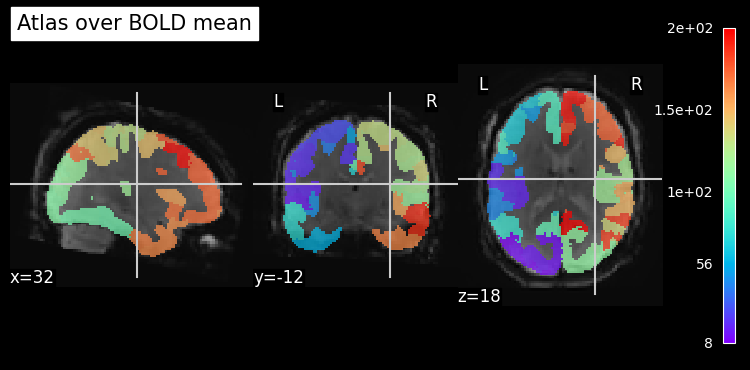
# Plot atlas over mean BOLD image to see if things match up
mean_bold = image.mean_img(bold_file, copy_header=True)
plotting.plot_roi(atlas_img, bg_img=mean_bold, title="Atlas over BOLD mean", cmap='rainbow')
plotting.show()

# Set up the masker
masker = maskers.NiftiLabelsMasker(labels_img=atlas_img, standardize="zscore_sample", detrend=True,
                                   t_r=2.0, low_pass=0.1, high_pass=0.01)

# Perform cleaning + parcellation
time_series = masker.fit_transform(bold_file, confounds=confounds)
print("Cleaned and parcellated time series has shape:", time_series.shape)
Cleaned and parcellated time series has shape: (275, 200)
/tmp/ipykernel_91490/1909134578.py:25: DeprecationWarning: From release 0.14.0, confounds will be standardized using the sample std instead of the population std.
  time_series = masker.fit_transform(bold_file, confounds=confounds)
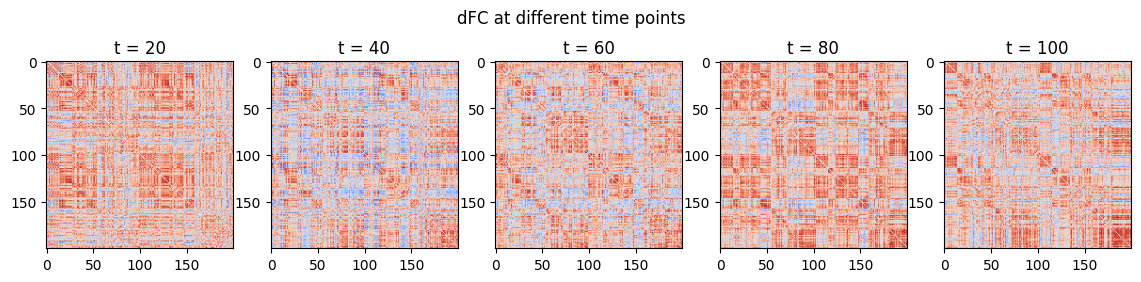
And finally estimate dFC:
[5]:
from comet import connectivity
from matplotlib import pyplot as plt

sw = connectivity.SlidingWindow(time_series)
dfc = sw.estimate()

# Plot
fig, ax = plt.subplots(1, 5, figsize=(14, 3))
fig.suptitle("dFC at different time points")
for i in range(5):
    ax[i].imshow(dfc[:,:,(1+i)*20], cmap="coolwarm", vmin=-1, vmax=1)
    ax[i].set_title(f"t = {(1+i)*20}")
/home/mibur/miniconda3/envs/comet-test/lib/python3.13/site-packages/tqdm_joblib/__init__.py:4: TqdmExperimentalWarning: Using `tqdm.autonotebook.tqdm` in notebook mode. Use `tqdm.tqdm` instead to force console mode (e.g. in jupyter console)
  from tqdm.autonotebook import tqdm